

When IAM Policies Can’t Replace Simple File Sharing
You’ve been asked to give a contractor access to a single S3 prefix. It should take five minutes. Instead, you’re deep in IAM policy JSON, juggling s3:GetObject, s3:ListBucket, and prefix conditions, only to discover that listing works but object reads still fail with AccessDenied. If you manage S3 in a growing company, this isn’t an edge case. It’s the default experience. IAM policies are incredibly powerful, but for routine S3 permission management (especially file sharing), they’re often the wrong level of abstraction.
Why IAM Policies Break Down for File Sharing
IAM operates at the API level, not the “folder” level most teams think in.
To grant access to /reports/2024/, you need to:
- Allow s3:ListBucket with a prefix condition (or users can’t enumerate keys)
- Allow s3:GetObject on the corresponding object ARNs
- Ensure no conflicting bucket policy exists
- Validate there’s no explicit deny anywhere in the evaluation chain
Miss any one of these, and the result is inconsistent behavior that’s difficult to debug.
The underlying issue is structural: S3 doesn’t have real folders, and IAM doesn’t model user intent—it models API permissions. That mismatch creates friction for what should be simple tasks.
The Two Predictable Failure Modes
When access requests pile up, most teams fall into one of two patterns.
Over-permissioning
To avoid another debugging session, you grant broader access:
- s3:* on a bucket
- Wildcard prefixes
- Long-lived permissions for short-term needs
It solves the immediate problem, but quietly erodes least-privilege controls over time.
Policy sprawl
Alternatively, you do it “correctly” every time:
- Custom IAM policies per user or use case
- Prefix-scoped conditions for each scenario
- Separate roles for contractors, vendors, internal teams
Six months later, you have dozens of policies with unclear ownership, limited visibility, and no easy way to audit relevance. Both outcomes are rational. Neither scales cleanly.
What Teams Actually Need from S3 Permission Management
Most real-world S3 workflows are simpler than IAM suggests. They require:
Prefix-level access control
Users need access to /client-alpha/ but not /client-beta/. This is standard in multi-tenant or project-based environments.
Clear separation of actions
Upload vs. read vs. delete should be easy to assign without combining multiple IAM statements.
Immediate visibility
You should be able to answer “who can access this prefix right now?” without running Access Analyzer or reviewing multiple policies.
Time-bound access
Contractors and agencies need access that expires automatically, without manual cleanup.
IAM can model all of this, but not without significant operational overhead.
The Hidden Cost of “Just Use IAM”
In large enterprises, IAM complexity is absorbed by:
- Dedicated security or platform teams
- Policy automation frameworks
- Continuous audit processes
In smaller teams, those layers don’t exist. If you’re the AWS admin at a 50-person company, you’re likely:
- Handling ad hoc access requests via Slack
- Balancing speed with security
- Acting as the bottleneck for any IAM change
There’s no lightweight mode for S3 permissions. Every request goes through the same system designed for fine-grained, API-level control at scale. That’s where the friction comes from…not a lack of knowledge, but a mismatch between tooling and task complexity.
What Good S3 Permission Management Looks Like
For teams working with shared data, contractors, or cross-functional access, effective S3 permission management should feel closer to file sharing than policy engineering. That means:
Direct visibility into access by prefix
You can see who has access to /reports/2024/ instantly, without parsing JSON.
Fast, low-risk changes
Grant or revoke access in seconds, without editing IAM policies or risking unintended side effects.
Separation from IAM identity logic
IAM handles authentication and baseline roles; routine file access is managed independently.
Browser-based workflows
No CLI, no SDK, no tickets—just a clear interface for managing access.
This isn’t about replacing IAM. It’s about removing it from workflows it wasn’t designed to handle efficiently.
Closing the Gap with Purpose-Built Tooling
There’s a growing category of tools focused specifically on S3 permission management at the prefix level—bridging the gap between IAM’s power and day-to-day usability.
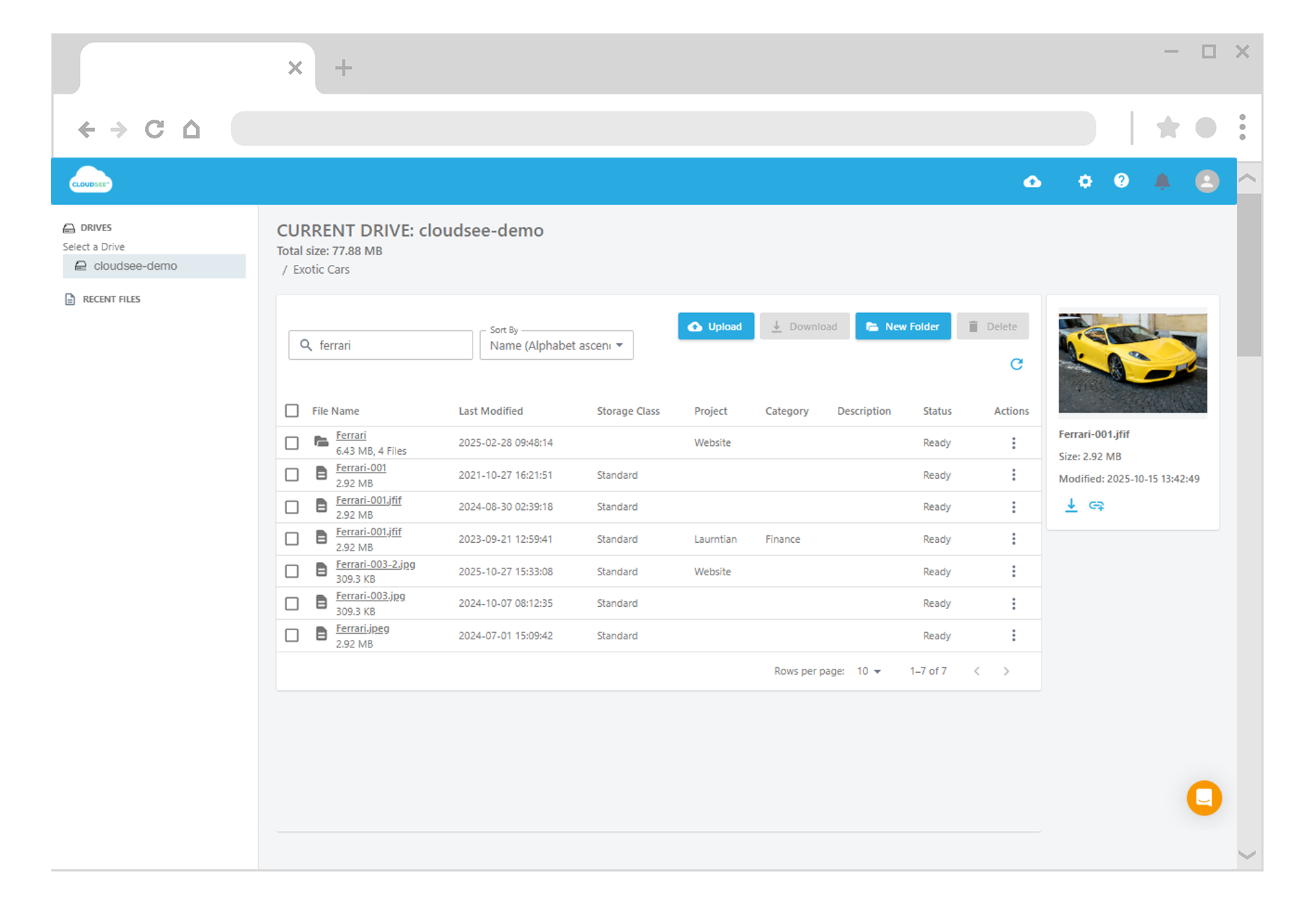
CloudSee Drive is one example. It provides:
- Folder-level permission controls for S3
- A visual interface for managing access
- Faster onboarding for non-IAM specialists
VisionAST reported a 75% reduction in time spent managing S3 permissions after adopting it—largely by eliminating repetitive IAM work. If your team is spending hours each week on access requests, the issue likely isn’t IAM expertise. It’s that IAM is being used for a job it wasn’t optimized to do.
Leave A Comment