

AWS S3 Annotations is one of the more meaningful S3 upgrades in years. For the first time, you can attach rich, structured metadata to objects at scale: up to 1,000 mutable annotations per object, with dramatically expanded storage limits, all queryable through managed Iceberg tables. That’s not a minor enhancement. It fundamentally changes how metadata can be stored and used inside S3. If you manage S3 day to day, the real question is if this makes it easier to find anything on Monday morning. Not really.
S3 Annotations solves the storage problem. It doesn’t solve the discovery problem. For most teams, discovery is where the friction lives.
What S3 Annotations Changes
At a technical level, S3 Annotations closes a long-standing gap in S3’s metadata model. You now get:
- Up to 1,000 annotations per object (vs. 10 tags previously)
- Support for structured formats like JSON, XML, and YAML
- Automatic ingestion into S3-managed Iceberg tables
- Native queryability via Athena and Redshift
This removes the need to build and maintain a parallel metadata store just to make object context queryable. For teams already working in Athena or operating data lake architectures, that’s a meaningful simplification.
A practical example: a compliance pipeline can now attach classification annotations (e.g., PII, retention class, owner) directly to objects. Auditors can query those annotations across billions of objects using SQL, without exporting metadata elsewhere. That’s a real upgrade.
The Gap AWS Didn’t Close
What S3 Annotations does not provide is a usable way for humans to interact with that metadata. Everything about the feature assumes one of three users:
- Data engineers running Athena queries
- Automated pipelines or AI agents
- Teams already operating Iceberg-backed data systems
It does not help the much more common scenario: someone on your team needs to find a file. For example:
“Where are the Q3 client deliverables tagged ‘final’?”
With S3 Annotations, that answer technically exists. Retrieving it still requires:
- -Access to Athena or Redshift
- Knowledge of the annotation schema
- Writing and running a query
- Waiting for results
For most SMB teams, that’s not self-service. It’s a bottleneck. So while S3 now has a much “bigger brain” for storing context, it still lacks a “face”…a usable interface for discovery.
Why This Gap Matters More for SMB Teams
Enterprise teams will benefit from S3 Annotations almost immediately. They already have:
- Data platform teams
- Existing Iceberg or lakehouse infrastructure
- Query workflows built around Athena or Redshift
For them, Annotations integrates cleanly into what they’re already doing.
SMB teams face a different reality:
- No dedicated data engineers
- Ad hoc S3 usage across teams
- Frequent “can you find this file?” requests
- Limited appetite for building internal query tooling
For these teams, S3 Annotations introduces a new capability but not a usable workflow. The result is familiar: more powerful infrastructure, but no reduction in day-to-day friction.
Where Discovery Still Breaks Down
Even with rich annotations, the core usability gaps in S3 remain:
- No unified search across buckets and prefixes
- No natural-language or attribute-based discovery
- No fast way to preview and validate files
- No self-service access for non-technical users
The AWS Console isn’t designed for this, and S3 Annotations doesn’t change that. The operational reality stays the same: finding files still depends on whoever understands the bucket structure…or whoever can write the query.
What Smart Teams Should Do Now
S3 Annotations is still worth adopting, but with clear expectations.
1. Treat annotations as a schema, not a dumping ground.
Define consistent fields (e.g., project, status, owner, classification) early. The value of annotations compounds only if they’re structured and predictable.
2. Align annotations with real retrieval needs.
Don’t just store metadata because you can. Store what people will actually search for later.
3. Decide early: build or buy the discovery layer.
If your team needs human-friendly search across S3, you have two options:
- Build a query and UI layer on top of Athena/Iceberg
- Use an existing tool designed for S3 discovery
The key is recognizing that S3 Annotations does not eliminate this decision. It makes it more urgent.
The Opportunity S3 Annotations Creates
S3 Annotations is not a complete solution. It’s infrastructure. It gives you a scalable, queryable metadata layer that didn’t exist before. That’s valuable—but only if something makes it usable.
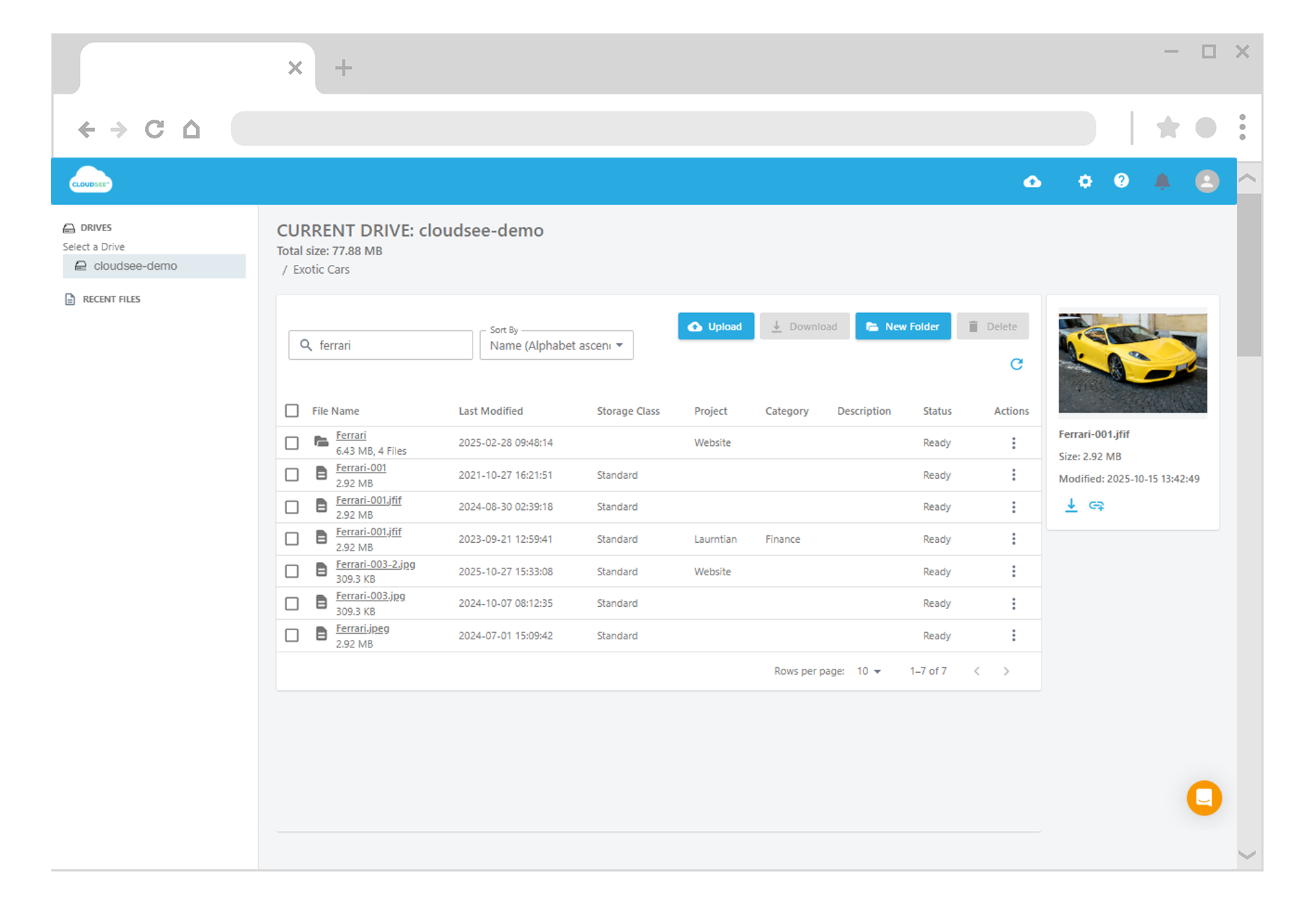
Tools like CloudSee Drive sit in that gap: a browser-based layer that indexes S3 and makes metadata, whether tags or annotations, searchable by humans, not just query engines. As annotation data becomes richer (AI-generated summaries, classifications, compliance flags), the value shifts toward tools that can expose that context quickly and intuitively.
AWS built the data layer. It did not build the experience layer. If your team’s bottleneck is still “finding the file,” that distinction matters.
Leave A Comment