

Before you approve AI agent S3 access, inventory the buckets it would touch. Not in the next sprint…before you attach the role. That’s the lesson from the recent ZCode incident, and it applies to every AWS admin with an “it only needs read access” request sitting in the queue.
Recently, a developer reported that Z.ai’s ZCode coding assistant created an encrypted archive from a local workspace and repeatedly attempted to upload it to Alibaba Cloud object storage. One analyzed archive contained 42,411 files and totaled 313 MB. Git-related material—including commit objects, reflogs, and cached LFS assets—made up 86.6% of the payload.
The researcher’s 564 observed upload attempts failed, so the captured 313 MB archive should not be described as successfully uploaded in that test. But the behavior still matters. A tool with broad filesystem access packaged far more than most developers would expect a coding assistant to need.
Z.ai apologized, attributed the behavior to repository indexing connected to its Repo Wiki feature, removed the snapshot-upload path in ZCode 3.14.0, and open-sourced the client. That may address the product-specific issue but does not change the broader AWS problem: a tool with S3 read access can retrieve whatever objects its permissions allow…not merely the clean, current files everyone assumes are in the bucket.
Your buckets have a memory
The unsettling part of the ZCode story is the Git history. Most of the captured payload was not the current source tree. It was Git’s accumulated memory: old commits, reflogs, LFS cache, and other artifacts nobody thinks about when installing an assistant. Git history often contains things teams thought they removed:
- Credentials committed during an emergency fix
- Old config files and internal hostnames
- Deleted branches with code that never shipped
- Earlier versions of customer exports or migration scripts
- Private keys someone removed from the working tree but not the repository history
S3 has the same problems. Most buckets older than a couple of years have a sediment layer. Even a bucket described as “marketing assets” or “application uploads” may contain:
- Terraform state files, which can expose infrastructure details and, in poorly managed environments, secrets
- SQL dumps and database backups from one-time migrations
- .env files and deployment bundles copied to S3 for convenience
- Log exports containing customer emails, IP addresses, identifiers, or session data
- Temporary exports under tmp/, archive/, or backups/
- Prefixes created by people who no longer work at the company
An agent doesn’t understand business context. It doesn’t know that legacy/ is radioactive, that old/ means “please forget this exists,” or that public/ is a naming convention. An agent with s3:GetObject permission can read the objects its policy permits. “Read-only” is still a data-export capability.
Inventory before policy
You cannot meaningfully scope access to data you have not examined. Start with a targeted first pass on the bucket in question:
aws s3api list-objects-v2 --bucket BUCKET_NAME --output table
Use the output to inspect object names, sizes, and modification dates. Search for obvious hazards: .env files, tfstate, SQL exports, log archives, backup files, temporary prefixes, and anything whose name suggests somebody planned to clean it up later.
Don’t confuse that with full discovery. On a large bucket, the CLI must page through the object set, which can take time and generate LIST request costs.
Filename checks also miss the file called marketing-export-final.csv that happens to contain customer records. For recurring, bucket-wide visibility, enable S3 Inventory. It produces scheduled inventories of objects and metadata in CSV, ORC, or Parquet formats that can be queried with Athena. It is useful for questions such as which objects are old, unencrypted, stored under a risky prefix, or managed by a particular lifecycle pattern.
If you need to find sensitive content rather than suspicious filenames, use Amazon Macie. Macie is designed to help discover and classify sensitive data in S3, especially personally identifiable information (PII) that may be hiding inside otherwise ordinary-looking files.
The problem is speed. S3 Inventory is scheduled. Macie is built for discovery and classification, not a same-morning vendor-access decision. CLI listing works immediately, but it gets unwieldy across large buckets and accounts.
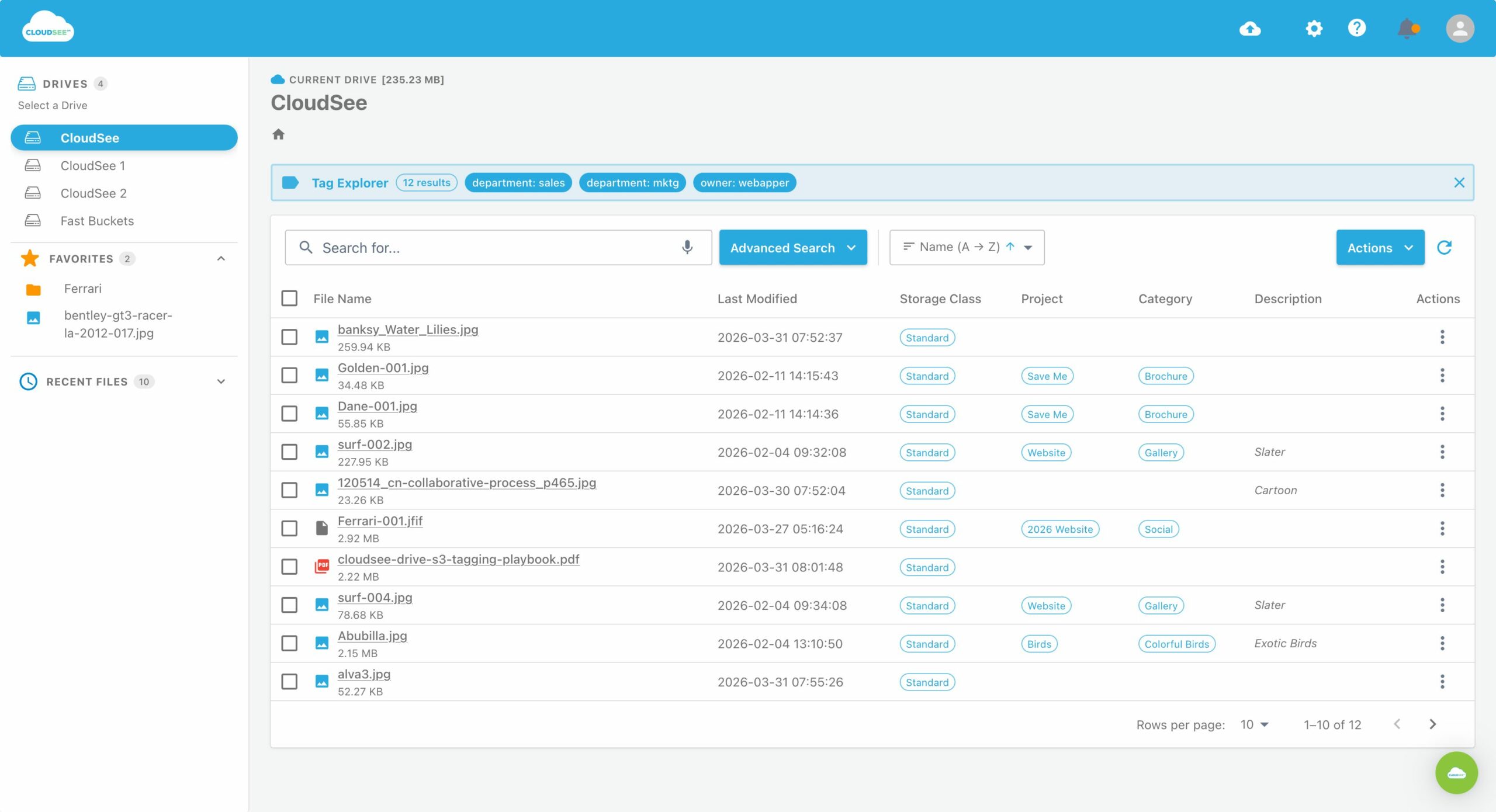
That’s where CloudSee Drive helps. Fast Buckets indexes existing S3 buckets in place so teams can search files quickly, while Tag Explorer makes tag-based discovery practical without individually calling GetObjectTagging across a large object set. It is not a replacement for S3 Inventory or Macie. It is the fastest way to answer the operational question behind an access request: “What is actually in this bucket right now?”
Whatever tools you use, document your findings. Then decide which specific prefix or, ideally, which specific copied data set, the agent has a real reason to read.
Scope the role, not the bucket
Do not let an AI tool borrow a human user’s credentials. Do not reuse an existing application role because it already works. Create a dedicated IAM role for the agent or vendor, with a name that makes its purpose obvious six months from now. Scope it to one approved prefix, such as agent-share/, and ensure the bucket-list permission is restricted to that same prefix.
Grant GetObject only for the objects beneath that prefix. Leave out PutObject and DeleteObject unless the use case genuinely requires writes. If the agent must write, give it a separate destination prefix rather than letting it modify the source data it reads.
The strongest default is often a dedicated sharing bucket. Copy only the approved objects into that bucket, grant the agent access there, and apply a lifecycle expiration rule so the shared data does not become the next bucket’s sediment layer. It adds work at the start, but it makes the blast radius painfully obvious, which is exactly what you want during a security review.
Log what it reads
CloudTrail does not record S3 object-level API activity in ordinary management-event logging. Enable CloudTrail data events for the buckets or prefixes an agent can access, so you can answer “what did it pull?” with evidence rather than a vendor assurance.
S3 data events can capture object-level activity such as reads and writes, and CloudTrail logs can be queried with Athena for investigation and audit workflows.
IAM Access Analyzer can help with permission rightsizing by generating policies from supported CloudTrail access activity. Don’t expect it to reconstruct exact S3 object-level least-privilege permissions from S3 data events. Use it as a review tool.
Review the activity after the pilot. If the agent only needed 200 objects under one prefix, that’s useful evidence for tightening the role. If it touched a broader data set than expected, you have learned something before the pilot went into production.
The rule for AI agent S3 access
ZCode users learned what their tool was packaging because someone looked closely at local artifacts and network behavior. Most AWS teams will not get that kind of visibility into every AI vendor, browser extension, agent framework, or “connect your cloud” workflow.
- Keep the controls on your side:
- Inventory the target bucket before approving access
- Identify old backups, state files, logs, and sensitive exports
- Give each tool a dedicated IAM role
- Scope permissions to a narrow prefix, not the whole bucket
- Prefer a dedicated, temporary sharing bucket for sensitive or limited data sets
- Log S3 object reads with CloudTrail data events
- Review real usage before expanding access
AI agent S3 access is becoming a standing request category. The inventory pass is what lets you say yes without guessing. Before you approve the next request, make the data set visible, narrow, and the reads auditable.
If you need a faster answer to “what is actually in these buckets?” before the next AI access request lands, book a CloudSee Drive demo.
Leave A Comment