CloudSee Drive Advanced Search
Introducing CloudSee Filters
CloudSee Drive search does what it says — finds stuff by keywords. That’s helpful…until you’re staring at 700 objects when you need those 12 Q1 PDFs with “invoice” in the name (but it’s still better than Console…).
Filters fixes that.
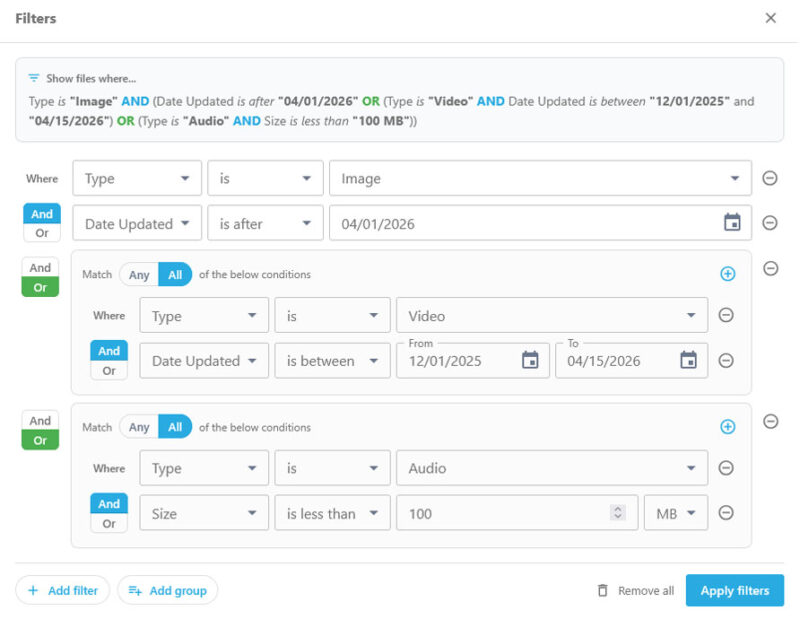
You’ll find Filters in the Advanced Search menu, next to Ask AI and Tag Explorer. Open Filters and build your search row by row: pick a criteria, pick an operator, set a value.
Stack rows with AND/OR logic.
Group conditions for compound queries: “file name contains ‘invoice’ OR ‘receipt,’ AND type is PDF, AND updated after December 31, 2025.”
As you build, a plain-English preview shows you exactly what you’re about to run before you pull the trigger.
No guessing. No scrolling through noise. Just the files you really want.
Everything else (search bar, natural language, Tag Explorer) stays exactly where it is. Filters gives you a sharper tool when you need it.
What CloudSee Filters Can Search
Basic Metadata
New Filters