
CloudSee Drive Large File Uploads

Before CloudSee Drive

Uploading a 50GB database backup to S3 fails at 90%…for the third time. Hours wasted.

AWS admins know the pain: standard S3 uploads cap at 5GB, offer zero progress monitoring, and don’t handle network hiccups.

The workaround? Manually configure multipart uploads with AWS CLI, calibrate chunk sizes, implement retry logic, and script parallel transfers. It’s complex, time-consuming, and error-prone.
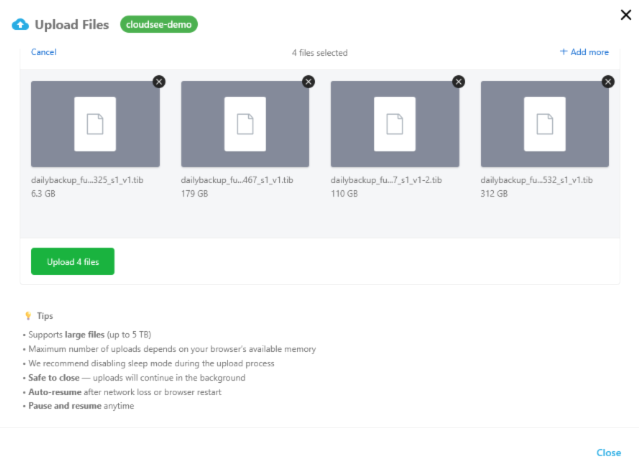
CloudSee Drive: Large File Uploads

After, with CloudSee Drive

CloudSee Drive’s Large File Uploads changed the game.

Upload files up to 5TB — that’s 1,000x the previous limit — with the simplicity of a standard upload.

Close your browser safely; uploads continue in the background. Network drops? Auto-resume. Need to pause? Done. Add AWS Tags during upload.

No scripting, no SDK coding, no administration required.

The technical heavy lifting — parallel processing, automatic recovery, progress monitoring — happens behind the scenes. Your team stops troubleshooting failed uploads and gets back to meaningful work.

AWS administrators deserve tools that work as hard as they do. Large File Uploads delivers reliability without complexity.

CloudSee Drive

Your S3 buckets.
Simple. Searchable. Superfast.

For AWS administrators and end users,
an Amazon S3 file browser…
in your browser.

Deliver a better user experience:

  • Supports uploading files up to 5TB (previously 5GB).
  • Safe to close…uploads will continue in the background.
  • Auto-resume after network loss or browser restart.
  • Pause and resume anytime.
  • Add AWS Tags.
  • Simple upload manager interface.

What CloudSee Users Say

To keep up with inbound customer queries about DMS feeds, we needed a file management and collaboration tool. We chose CloudSee Drive and I am happy with that decision. We can manage files from any device. I consider this the ultimate productivity tool for managing content on S3. We can organize and tag files easily, which increases staff productivity in the long term.

Pete Carusone
VisionAST

I’m able to select which user can see which bucket and with which permissions. That is a game changer!

David L.

We use CloudSee Drive to access company file archives in S3. CloudSee works great to setup designated recovery users and manage which buckets they have access to. With S3, you can’t restore more than one file at once and you can’t search very well. We needed a solution to both those issues. CloudSee works great for what we need.

Derek B.

Ready for a CloudSee Drive Demo?

If you want a personal deep-dive 20-minute live presentation, we invite you to schedule a demo.


    Make Amazon S3 Simple, Searchable, and Superfast.