

You know the bucket. The one that started clean…a handful of prefixes, a logical structure, maybe even a naming convention someone documented in Confluence.
That was 18 months ago.
Now it’s 400,000 objects deep, junior engineers are dumping files into `/misc/`, and the data science team has created three different folders called `final_v2`.
Welcome to the Amazon S3 folder problem.
It’s not that you’re not bad at your job. You’re just trying to impose structure on something S3 was never designed to enforce by itself.
Why Amazon S3 “Folders” Get Out of Control
The first thing most teams never fully internalize: S3 doesn’t really have folders.
What look like Amazon S3 folders in the console are just object key prefixes (strings in front of object names that the UI renders as a hierarchy). There’s no real folder primitive, no built-in rules about where things can go, and no native way to stop someone from creating `project/assets/final/FINAL_v3_USE_THIS_ONE/` and using it in production.
That creates a specific kind of operational debt for S3 owners:
Multiple teams, one bucket
Analytics, app teams, and “shared storage” all land in the same buckets. Nobody aligned on a prefix convention because nobody thought they’d need one.
No metadata discipline
Objects get uploaded with generic names and no tags, so “search” becomes scrolling through paginated lists in the console.
Lifecycle rules don’t map to reality
Without consistent prefixes, lifecycle policies either over-target or under-target, and data just sits in Standard.
Console limitations
The AWS Console pages out at 1,000 objects and was never designed as a file browser for millions of keys.
The result: you, as the AWS admin, become the human search engine for your organization’s S3.
Why This Matters for AWS Admins & Cloud Architects
A messy prefix structure is not only annoying, but it undermines the three things you’re measured on: time, cost, and risk.
Time sink
Studies consistently show knowledge workers lose hours each week hunting for documents. In S3 environments, a lot of that time rolls up to the people who actually understand buckets, prefixes, and IAM. Welcome to Buckethell, population you.
Cost bloat
When prefixes don’t align with data age, environment, or workload, you can’t cleanly target lifecycle policies. Objects that should be in Infrequent Access or Glacier stay in Standard until someone notices the bill.
Access and security drag
Disorganized buckets make it harder to apply meaningful IAM conditions and bucket policies. If you can’t confidently describe what lives under a prefix, you can’t safely expose it to a group, tool, or external account.
As an admin, you’re the one who inherits that mess.
Practical Steps to Get Amazon S3 Folders Under Control
1. Define a Prefix Convention and Make It Policy
Start with one simple rule: nothing goes in a bucket without following a prefix pattern.
A pattern like `{env}/{team}/{system}/{dataset}/{yyyy}/{MM}/` gives you environment, ownership, workload, and date in one structure. It’s predictable, it maps to lifecycle, and it makes IAM conditions easier to reason about.
Document it in your internal runbooks and enforce it via:
- Terraform/CloudFormation modules that bake the convention into new workloads.
- Code reviews for anything that writes to S3.
- Guardrails in upload scripts, Lambdas, or internal tooling.
2. Use Object Tags Like They Matter
S3 object tags are one of the few levers you get that cut across prefix chaos. Use them.
At minimum, standardize tags for:
- `env` (prod, staging, dev)
- `data_classification` (pii, internal, public)
- `owner` or `cost_center`
- `system` or `application`
These tags pay off in lifecycle policies, S3 Storage Lens, cost allocation, and search in tools that actually respect them (including CloudSee Drive’s Fast Buckets search).
3. Tie Lifecycle Policies to Structure
Once you have consistent prefixes and tags, lifecycle policies go from “broad hope” to “surgical control.”
Examples:
- Transition anything under `prod/logs/yyyy/MM/` to IA after 30 days and Glacier after 90.
- Expire temporary export data tagged `data_classification=temp` after 7 days.
Prefixes give you the path structure. Tags give you semantic hints. Together, they make lifecycle rules match how your organization actually uses data.
4. Stop Treating the AWS Console as a File Browser
The S3 console is good for configuration and small-scale inspection. It is not a file system browser for millions of objects across dozens of buckets.
If your users (or you) are…
- Clicking through pseudo‑folders to find a single object
- Exporting CSVs of object lists to search them locally
- Asking for read‑only console access “just to download files”
…that’s a tooling issue, not a user issue.
This is where CloudSee Drive can help.
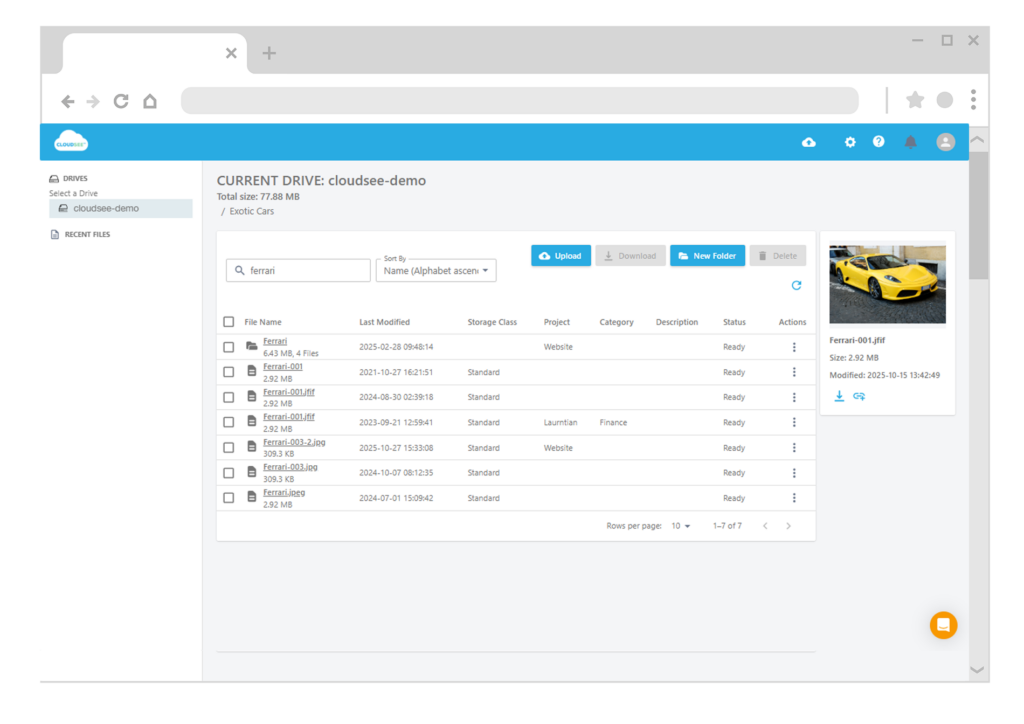
CloudSee Drive gives AWS administrators a browser-based S3 file interface that:
- Lets you expose selected buckets to users without giving them AWS Console or credentials
- Indexes S3 with Fast Buckets, so users can search across millions of objects in sub-second time by name, tags, or metadata
- Extends uploads up to 5 TB with parallel processing and recovery, so large data moves don’t require custom scripts
VisionAST, an automotive analytics customer, used CloudSee Drive to cut S3 management time by roughly 75%, primarily by moving everyday “where’s that file?” requests out of the console and into a UI people can actually use.
5. Require Metadata at Upload Time
Even with a better prefix scheme, you’ll never have perfect structure. That’s where metadata closes the gap.
By making descriptions and tags part of the upload path, you let users (and non‑technical teams) search by what a file is, not just where it lives.
CloudSee Drive supports:
- Searching on AWS object tags
- User-friendly descriptions and custom metadata fields
- A Finder/Explorer-style UI so end users can apply this without ever touching the console
You keep S3 as the source of truth. They get a sane way to find and manage files. You stop being their default help desk.
It All Starts With One Bucket
You don’t need to fix your entire S3 estate this quarter. Pick your messiest bucket:
- Define and document a prefix convention for new writes.
- Add or refine lifecycle policies using prefixes and tags.
- Stand up a tool like CloudSee Drive so users can actually navigate what already exists while you bring order over time.
The structural debt in S3 won’t disappear overnight, but it’s absolutely fixable. One bucket, one prefix pattern at a time.
TL;DR
Amazon S3 “folders” are just prefixes rendered as hierarchy, which is why bucket structures drift into chaos over time. As an AWS admin or cloud architect, you fix that by enforcing a prefix convention, standardizing tags, tying lifecycle rules to structure, and getting out of the S3 console as a file browser. Tools like CloudSee Drive add indexing and metadata-driven search so users can self‑serve across millions of objects without AWS access, and you stop spending your day finding files for everyone else.
Leave A Comment