// Fast Buckets — S3 Search That Really Works
AWS Console can find it.
CloudSee Drive
already did.
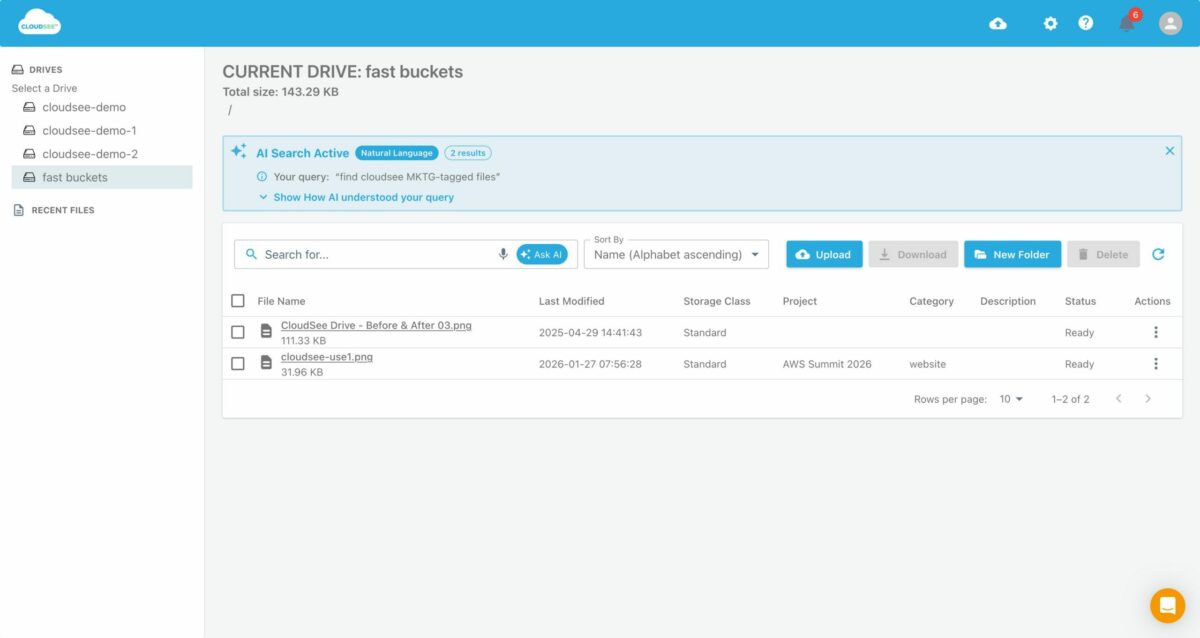
AWS Console’s S3 search only scans the folder you’re already in. S3 Browser slows to a crawl on large buckets. CloudSee Drive’s Fast Buckets finds any file — bucket-wide, any substring, any tag — before you finish typing.
// Works with any S3 bucket. No install required.
// AWS Console vs. CloudSee Drive
We tried to benchmark it. We couldn’t.
Benchmarking requires two tools doing the same job. They’re not.
// Why Teams Switch
Every S3 tool has the same blind spot.
They were built for small buckets in a different era.


// Head-to-head capabilities
What “search” really means.
Compare what each tool can actually do when a file is buried.
Capability |
CloudSee Drive |
AWS Console |
S3 Browser |
Cyberduck |
|---|---|---|---|---|
| Bucket-wide search Search all folders at once. |
✓ | ✕ | Partial | ✕ |
| Substring matching Find files without knowing the full name. |
✓ | ✕ | ✕ | ✕ |
| Tag & metadata search Filter by custom S3 tags. |
✓ | ✕ | ✕ | ✕ |
| Performance on 50K+ objects. Stays fast as buckets grow |
✓ | Freezes | Degrades | Degrades |
| Works in any browser No install required. |
✓ | ✓ | ✕ | ✕ |
| Mac, Windows & Linux Cross-platform. |
✓ | ✓ | Windows only | ✓ |
| Team access without IAM setup Grant access in minutes. |
✓ | ✕ | ✕ | ✕ |
AWS never built a real search for S3.
CloudSee Drive did.
// Fast Buckets: bucket-wide search, substring match, tag filter.
// Stop navigating. Start finding.
See Fast Buckets live.
20 minutes.
We’ll show you exactly how it works. No slides, no fluff.